

Compare tap lists.
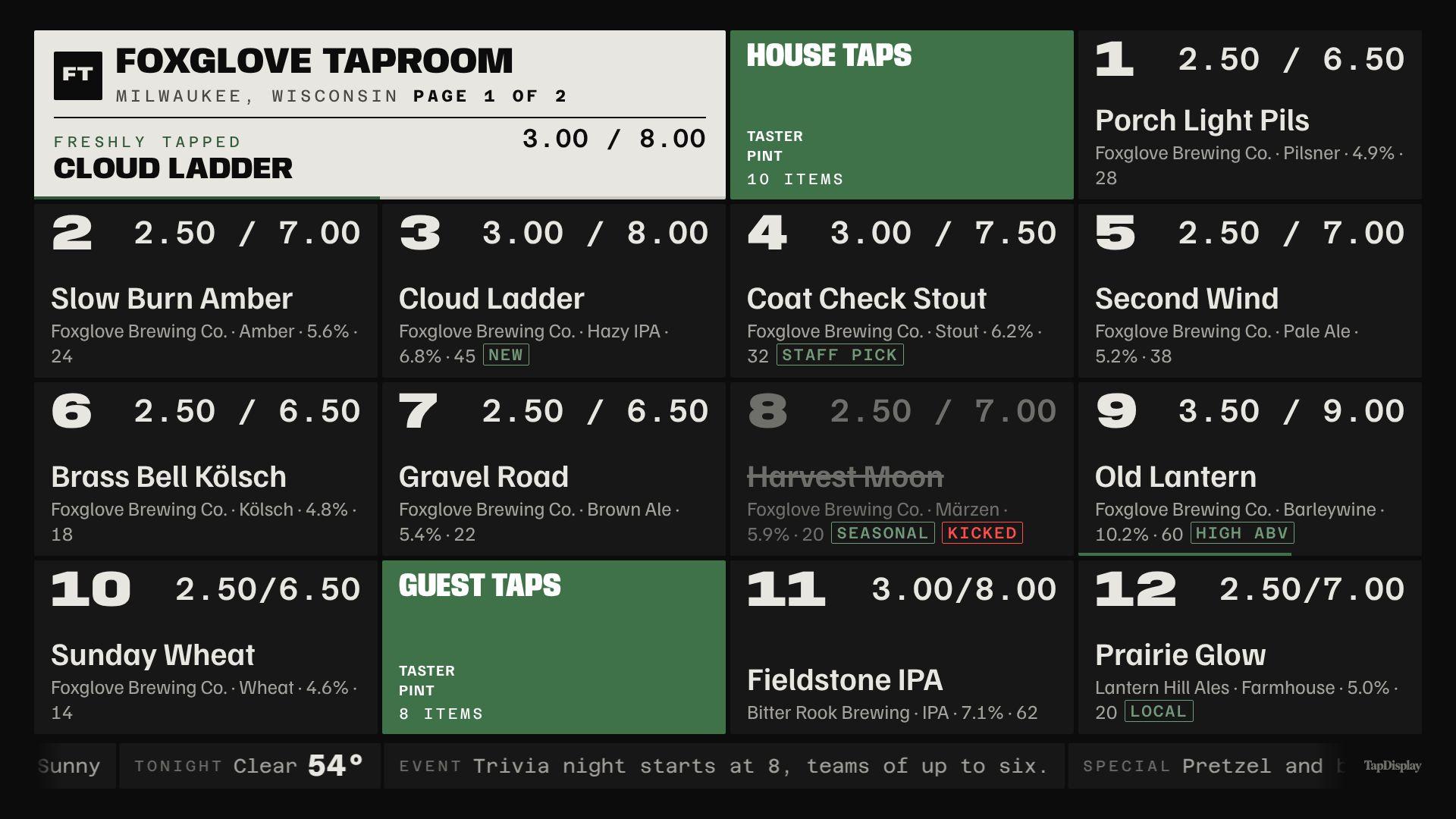
Most bars show their taps on a chalkboard, a printed list or a slideshow on the TV. Compare the work when a keg kicks, the list grows or you add a screen.
Shopping for software? Take these questions to every demo.
Four ways to show a tap list.
See how each handles a shift, including what TapDisplay does today.
| ChalkboardOr a letter board | Printed listPaper menus, a framed sheet | A slideshowSlides you make, on the TV | TapDisplayChanged from a phone | |
|---|---|---|---|---|
| A keg kicks | Someone stops pouring to erase it and write the next one. | Cross it out by hand, or print every copy again. | Edit the slide, then put it on the TV again. | One tap on a phone. It is struck through on every screen within about 30 seconds. |
| Who changes it | Whoever has a free minute and good handwriting. | Whoever has the file and a printer. | Whoever has the design file and knows the tool. | Owners, managers and staff, each with their own login. Staff get the menu and nothing else. |
| From where | At the board. | At a computer, then the printer. | Wherever the design file is. | A phone, a tablet or a computer. |
| A long list | Whatever fits on the board. | Whatever fits on the page. | Size the type and split the slides by hand. | The type adjusts to fit, then the board turns pages. TVs on the same list turn together. |
| A second screen | Another board to rewrite. | More copies to print. | Each screen shows the slides you give it. | Unlimited screens per location. One list across several TVs, or each its own sections. |
| Checking the wall | Walk over and read it. | Find a copy and read it. | Walk over and look. | Each screen tells you it is showing the latest, and you can reload one from the dashboard. |
| A mistake | Spot it, then erase it and write it again. | Spot it, then print it again. | Spot it, then fix the slide and load it again. | Every change lands in the activity log with who made it, and you can undo it. |
| The cost | Chalk, and 30 to 40 minutes a day of someone's time. | Paper and ink, and the time to redo it. | A TV, and the time to redo the slides. | $49 a month or $499 a year per location, with unlimited screens. |

A chalkboard at 40 minutes a day costs $4,380 a year in labor at $18 an hour. TapDisplay is $499 a year per location.See the math
Tap list software, side by side.
What each company's own site says, checked October 15, 2026: each name links to its pricing page, and each fact to the page that says it. Not stated means its site does not say. Prices change, so check theirs before you decide.
| Untappd for BusinessEssentials, Premium | EvergreenStarter to Enterprise | Taplist.ioStarter, Pro | DigitalPourBy quote | BeerMenusDigital Beer Boards | TapDisplayOne plan | |
|---|---|---|---|---|---|---|
| The price | ||||||
| Price with TV menus | By quoteReported by third parties: about $899 a year ($89.99 a month) for Essentials, and $1,199 a year ($119.99 a month) for Premium. Sources: Brewlytics, Toolradar. | Not listed on its pricing page | $39 a month for one TV (Starter); $59 a month for unlimited TVs (Pro) | By quote | $99 a month, or $58.25 a month billed yearly | $49 a month or $499 a year |
| Charged per | Not stated | Not stated; plans scale by location count | Location | Not stated | Not stated | Location |
| TVs included | Not stated | Not stated | 1 on Starter, unlimited on Pro | Not stated | Multiple screens | Unlimited |
| Free trial | Not stated | Yes, no card | 14 days | Not stated | 14 days, no card | 14 days, card required |
| Billing | Not stated | Month to month, or yearly at a discount | Monthly, or yearly at a discount | Month to month, no contracts | Monthly or yearly | Monthly or yearly |
| On the board | ||||||
| Keg levels | Not stated | Yes | With a keg sensor | On its web menus; not stated for TVs | Not stated | Yes, set from your phone |
| A kicked keg | Hidden when out of stock in a synced POS | Removed when sold out | Cleared from every screen | Not stated | Can be moved to a hidden section | Stays on the board struck through, or comes off with one tap |
| Live on the board | ||||||
| Weather | Not stated | Not stated | Not stated | Not stated | Not stated | Yes, from the National Weather Service |
| A countdown | Not stated | Not stated | Not stated | Not stated | Not stated | Yes, like Kitchen closes in 45 minutes |
| Live sports scores | Not stated | Not stated | Not stated | Not stated | Not stated | Yes, for the teams you pick |
| Running it | ||||||
| Getting your list in | Their team imports it for you, on Premium | Not stated | Not stated | Not stated | Their team adds your beers from a file you send | You import a CSV file, or paste a list |
| Taking your menu out | Its menu history, as a CSV file | Not stated | Not stated | Not stated | Not stated | The whole menu, as CSV or JSON |
| Change history and undo | Not stated | Not stated | TV settings can be reverted | Not stated | Not stated | Every change with who made it, and undo |
| Checking each TV | Not stated | Not stated | With a Signage Stick, through the stick's own tools | Not stated | Not stated | Each TV shows it has the latest; reload one from the dashboard |
| What the TV needs | A supported streaming stick, like a Fire TV Stick, running its app | A Fire TV Stick they provide | Its app on a supported streaming or signage device | A Windows 11 computer stick or mini PC | Its app on a Fire TV | Its web browser and a 6 character code |
Questions for every demo.
Comparing tap list software? Ask every company the same questions and write down the answers. These are ours.
- 01
Is it priced per screen or per location?
TAPDISPLAYPer location, with unlimited screens: $49 a month or $499 a year. Running 3 to 9 locations, $39 a month or $399 a year each.
- 02
Is the price on the website?
TAPDISPLAYYes. Every price is on the pricing page, and what the calculator there quotes is what checkout charges.
- 03
How long does a change take to reach the TV?
TAPDISPLAYEvery screen updates within about 30 seconds of a save.
- 04
Can staff change the menu without touching anything else?
TAPDISPLAYYes. Staff get the menu and nothing else, each with their own login. Owners and managers set the screens and the looks.
- 05
What happens when the list is too long for the screen?
TAPDISPLAYThe type adjusts to fit, then the board turns pages. It never scrolls, and TVs on the same list turn their pages together.
- 06
Can one list run across several TVs?
TAPDISPLAYYes. One list can be split across several screens, or each screen can show its own sections.
- 07
Can I see what each screen is showing?
TAPDISPLAYYes. Each screen tells you it is showing the latest, and you can reload one from the dashboard.
- 08
Can I see who changed what, and undo it?
TAPDISPLAYYes. Every change lands in the activity log with who made it, and you can undo it.
- 09
Do I have to type my list in?
TAPDISPLAYNo. Import a CSV file, or paste a list. When you add a beer, start typing and pick a match from the catalog; it fills in the brewery, style and ABV.
- 10
Can I take my menu with me?
TAPDISPLAYYes. Export it any time, as a CSV or JSON file.
- 11
What does the TV need?
TAPDISPLAYA TV that can open a web page. It shows TapDisplay's page in a browser, pairs with a 6 character code, and never holds a login.
- 12
Can I try it first?
TAPDISPLAYYes. One 14 day free trial per account. Checkout takes a card.
What it does not do.
- SCREENS
No charge per screen.
Unlimited screens at every location.
- THE TV
Not a TV app.
The TV shows TapDisplay's page in a browser and pairs with a 6 character code.
- DESIGN
No blank canvas.
Pick one of nineteen looks and add your logo and color. Fonts come with the look; you cannot upload your own.
- SPEED
Not the moment you tap.
Every screen updates within about 30 seconds of a save.
- PRICE
One trial, then a plan.
One 14 day free trial per account; checkout takes a card. After it, $49 a month or $499 a year per location.
- POS
No POS connection.
Taps and prices change in TapDisplay, from a phone, a tablet or a computer.
Put it on your own TV.
Fourteen days free, on your own menu and your own screens. Checkout takes a card, and billing starts when the 14 days end.
Start free trial